1,17inch security CCTV Monitor 2,with grade A panel and industrial AD board, support 24x7x365 continously working 3, with RJ11 connectors.
Send Inquiry
Description
Send Inquiry
Features:
17-Inch Industrial Quality LCD With screen protector and RJ11 connector
Multi-Screen Viewing Options – Quad, split, single, and full-screen auto sequencing
Auxiliary Audio & Video Ports – Add speakers, route main display to a secondary composite monitor, and switch to VGA viewing of a PC or DVR
Specifications:
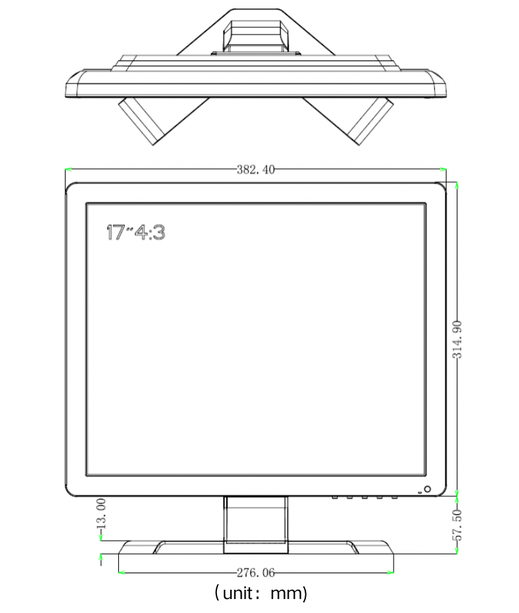
Drawings:
FAQ:
1. What is a RJ11 split monitor?
A RJ11 split monitor is a type of monitor that can display up to four different input sources simultaneously. It is commonly used for surveillance purposes in security systems, where multiple camera feeds need to be monitored at once.
2. What are the benefits of using a RJ11 split monitor?
Using a RJ11 split monitor allows for efficient monitoring of multiple camera feeds without the need for multiple monitors or constantly switching between screens. This improves overall surveillance and reduces the chance of missing critical events.
3. What input sources can a 17-inch quad split monitor support?
A 17-inch RJ11 split monitor can support a range of input sources, including analog cameras, IP cameras, and other digital video feeds. It is important to check the specifications of the monitor to ensure it supports the required input sources.
4. Can a 17-inch RJ11 split monitor be used for other purposes besides surveillance?
Although RJ11 split monitors are commonly used for surveillance purposes, they can also be used for other applications such as video production and editing, CCTV monitoring.
5. How do I configure the split screen on a 17-inch RJ11 split monitor?
The split screen configuration on a 17-inch RJ11 split monitor can vary depending on the model. However, most models come with a built-in menu system that allows you to select and adjust the layout of the split screens.
6. How do I maintain a 17-inch RJ11 split monitor?
To maintain a 17-inch RJ11 split monitor, you should avoid exposing it to extreme temperatures and moisture. Keep the monitor clean using a soft, damp cloth and avoid using harsh chemicals